
AI Home Design: ReHouse
FlowmaticHouse & Home
4.413.00 Reviews
- Version
- 1.6
- Installs
- 10.00K
- Age Rating
- Everyone
Screenshots

Our Review of AI Home Design: ReHouse
 Analysis by Appyee
When I want to rethink a room, I find it useful to see a visual possibility before buying paint or moving furniture. AI Home Design: ReHouse is aimed at that early, exploratory stage: it uses AI to help people picture changes at home, rather than replacing the decisions and practical checks that a real renovation requires. I’d treat it as a way to generate ideas and compare directions, not as a set of building plans.
What the free starting point means
The app is free to download, so you can try its basic appeal without paying upfront. It also offers in-app purchases, with items priced from $4.99 to $59.99. That range is worth keeping in mind before getting attached to a particular workflow: the free entry point does not mean every option or extended use is free. I would check what a paid item unlocks in the app itself before purchasing, and decide whether that specific benefit is useful for the room you are working on.
For me, that makes the value question less about whether the app is “free” and more about how much it helps me make a decision. A quick visual idea can be worthwhile even if I never pay, especially when I am choosing between a few broad styles. If I only want a precise shopping list or professional renovation drawings, though, I would compare other tools and services before spending on an AI design app.
Useful when the first decision is the hardest
AI room design is most helpful when I know something feels off but cannot name the solution. A room photo can give the AI a starting point, and its suggestions can help me test a different mood before doing any physical work. That is a more focused job than asking a search engine for “living room ideas,” because the reference is meant to be my own space rather than a polished room belonging to someone else.
That does not make a generated image a reliable preview of every real-world detail. I would use it to think about broad choices—such as whether a lighter, calmer direction suits the room—then check actual furniture dimensions, materials, lighting, and costs separately. The image is a conversation starter with myself, not a guarantee that the finished room will look exactly the same.
A practical way to test an idea
Imagine I am considering a small change to a bedroom but do not want to commit to new furniture yet. I can take a clear photo from a position that shows as much of the room as possible, then use the result to explore a different visual direction. Before taking the picture, I would move distracting clutter out of the main view and avoid shooting through a mirror; a cleaner reference gives me a more useful basis for judging the suggestion.
I would also keep the room’s fixed features in mind while reviewing the result. A window, doorway, radiator, or awkward corner can matter more than the AI’s attractive styling. Rather than asking, “Would I buy this exact room?”, I would ask, “Does this give me one change I can realistically try?” That small shift in expectations makes an AI concept more actionable and helps avoid treating decorative inspiration as a renovation plan.
How it fits among home-design alternatives
Compared with browsing inspiration galleries, ReHouse starts from a room you want to change, which can make the ideas feel more relevant to your own situation. Compared with a conventional interior-design service, it is a lower-commitment way to explore, but it cannot replace a person who can discuss measurements, constraints, priorities, and a complete project with you. And compared with room-planning software, an AI image may be better for visual inspiration than for exact placement or dimension-led planning.
Those differences matter if you are deciding what kind of help you need. For a color or style rethink, an AI-generated concept may be enough to get moving. For fitting a sofa into a tight space, checking a walkway, or coordinating a renovation, I would reach for a measuring tool, a floor-plan app, or a qualified professional instead. ReHouse makes the most sense as one step in a decision process, not the whole process.
First Impressions: A User-Friendly Interface
Upon launching AI Home Design: ReHouse, the first thing that caught my eye was its sleek and intuitive interface. It’s like the app knew that I’m not a professional designer and needed something straightforward and easy to navigate. The home screen greets you with a variety of options, allowing you to dive into designing right away or explore some inspiration from their curated galleries.
Getting Started: Easy as Pie
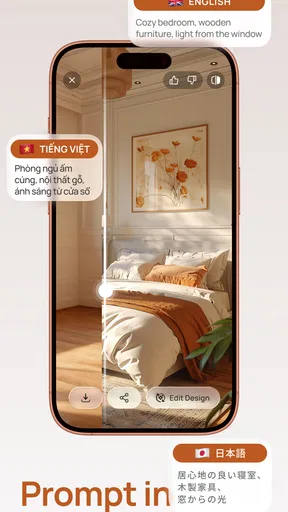
Once you're ready to start, the app guides you through a simple process of capturing your space. All you need is your phone's camera to take a few snaps of the room you want to redesign. The app’s AI kicks in quickly, analyzing your space and offering suggestions almost instantly. It's like having your personal interior designer on standby 24/7!
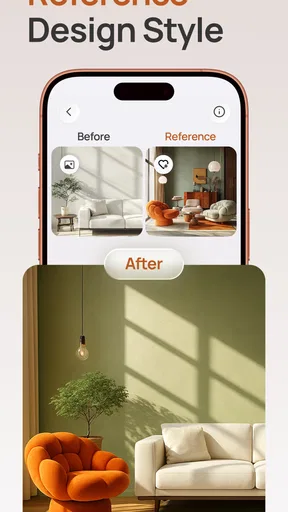
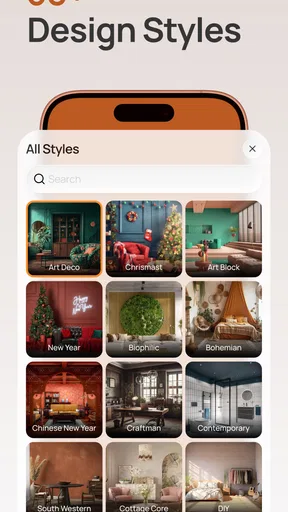
The AI offers a range of design styles to choose from, whether you're into minimalist chic, bohemian vibes, or something in between. I was impressed by how it adapts its suggestions to fit the unique dimensions and features of your room.
Customization Galore
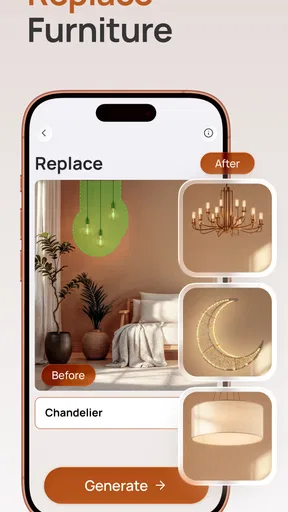
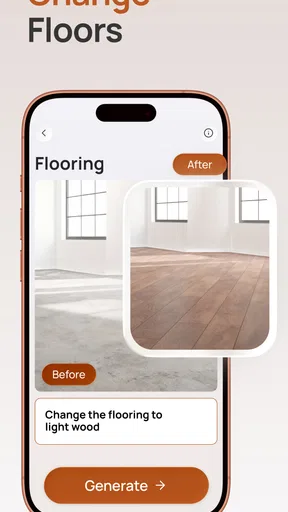
One of the standout features for me was the level of customization the app offers. Once the AI provides its initial suggestions, you're free to tweak to your heart's content. Want to change the color of that virtual couch? Easy. Thinking of swapping out the artwork on the walls? Done and done. It's like playing a game of Sims, but with your actual living space.
There’s also a handy furniture catalog that lets you explore and add pieces to your design. The app partners with various brands, so you can even shop directly if something catches your fancy. Talk about convenience!
Design Challenges: A Fun Twist
If you’re ever stuck in a creative rut, the app’s design challenges are a fun way to get those creative juices flowing. These challenges are like prompts, tasking you with designing a space based on specific criteria or themes. It’s a light-hearted way to explore different styles and maybe discover a new favorite look for your home.
Performance and Reliability
During my time with the app, I didn’t encounter any major hiccups. It runs smoothly for the most part, and the AI processes are impressively quick. Of course, like any tech, it’s not without its occasional glitches. There were a couple of times when the app froze mid-design. However, these instances were rare and didn’t detract from the overall experience.
Worth considering before you begin
Even a simple photo-based workflow benefits from a little preparation. I would take one image from a position that shows the room’s main layout, then, if needed, another that captures a feature the first angle misses. I would keep the original photo available for comparison and judge the output against what can actually change: walls and flooring may be fixed for now, while accessories or a paint choice may be easier to adjust. This keeps the app’s suggestions grounded in the order I can realistically tackle them.
There is also a useful distinction between editing for inspiration and choosing a product. A catalog item can help me imagine scale and style, but I would still verify the real item’s dimensions, finish, availability, and total cost before making a purchase. The appealing visual match is not enough by itself, particularly in a compact room where a few inches can affect circulation. That extra check is a small effort that prevents a promising concept from becoming an impractical shopping decision.
Who is likely to get the most from it?
I think the app suits renters and homeowners who want a low-pressure way to explore a room’s look, people who struggle to picture style changes from words alone, and anyone collecting ideas before discussing a project with family or a designer. Its Everyone content rating also makes it broadly accessible as a home-focused creative tool, though the purchase choices still call for a careful check by whoever manages spending on the device.
I would skip it if my main need were technical accuracy, exact room measurements, construction guidance, or a guaranteed match between a generated scene and a finished renovation. It is also a weaker fit if I already know precisely what I want and only need a dependable product comparison. In those cases, a measured floor plan, retailer specifications, or professional advice offers more practical certainty than visual experimentation.
Availability and a sensible trial
Vulcan Labs develops the app, which is listed in the House & Home category. It has a 4.5 average from around 350 ratings and more than 10,000 installs. The current version is 1.4, it was released on September 9, 2025, and it requires Android 7.0 or later. I’d start with a single room and a specific question—such as whether a warmer or cooler look feels right—rather than treating the first result as a complete redesign.
That small trial is also the best way to judge whether any paid option would be worthwhile for me. I would first see how far the free experience takes the idea, then consider a purchase only if its price and purpose are clear and it solves a need I actually have. The available purchase range, from $4.99 to $59.99 per item, makes checking the individual option more sensible than assuming every extra offers the same value.
Final Thoughts: A Game-Changer for Home Design
In a nutshell, AI Home Design: ReHouse is an innovative tool that brings professional-quality design into the hands of everyday users. Whether you’re a design enthusiast looking to revamp your space or a newbie just dipping your toes into the world of interior design, this app has something for everyone. It’s user-friendly, packed with features, and offers a unique blend of AI technology and creative freedom.
So, if you're ready to transform your living space without breaking the bank or hiring a pricey designer, give AI Home Design: ReHouse a try. It might just be the home makeover app you didn’t know you needed!
My buy-or-skip take
I would try it if I wanted fresh visual ideas for a room and was happy to treat those ideas as a starting point. Free access lowers the barrier to exploring, while the in-app purchases mean I would pause and check the specific value before paying. If I needed exact plans or a dependable answer about what will fit, I would choose a measurement-focused tool or professional help instead. For informal inspiration and early-stage decision-making, ReHouse is worth a look; for certainty, I would not rely on it alone.
Verdict
Strengths of AI Home Design: ReHouse
- Intuitive user interface for easy navigation.
- Wide variety of design templates available.
- AI suggestions enhance creativity.
- Real-time 3D visualization feature.
- Seamless integration with smart devices.
Limitations of AI Home Design: ReHouse
- Requires constant internet connection.
- High-quality features locked behind paywall.
- Limited customization in free version.
- Occasional lag with complex designs.
- Notifications can be intrusive.
Similar Picks in This Category
View All
Universal TV Remote Control
CodeMatics Media Solutions3.9

AlfredCamera Home Security app
Alfred Systems Inc.4.7

Planner 5D: AI Home Design
Planner 5D4.5

Universal Tv Remote-Cast to TV
One Music Player4.1

Zillow: Homes for Sale & Rent
Zillow Group4.8

99acres Buy/Rent/Sell Property
infoedge.com4.3
Frequently Asked Questions
What is AI Home Design: ReHouse and how does it work?
AI Home Design: ReHouse is an innovative app that utilizes artificial intelligence to help users design and visualize their home interiors. By analyzing your preferences and space dimensions, the app generates personalized design ideas and 3D models. It allows you to experiment with different styles, furniture, and color schemes before making any physical changes.
Is AI Home Design: ReHouse suitable for beginners?
Absolutely! AI Home Design: ReHouse is designed with user-friendliness in mind, making it ideal for both novices and experienced designers. The intuitive interface guides you through each step of the design process, offering suggestions and tutorials to help you create stunning interior layouts effortlessly.
Can I use AI Home Design: ReHouse on multiple devices?
Yes, AI Home Design: ReHouse supports multi-device synchronization. You can start a project on your smartphone and continue on your tablet or computer. Just ensure you're logged into the same account across your devices, and your designs will be seamlessly synced.
Does the app offer a variety of design styles and options?
AI Home Design: ReHouse offers a wide range of design styles, from modern and minimalistic to classic and eclectic. The app continually updates its library with the latest trends and furniture options, allowing users to explore and experiment with various aesthetics to find the perfect match for their taste.
Is there a cost associated with using AI Home Design: ReHouse?
AI Home Design: ReHouse offers a freemium model. While you can access basic features at no cost, premium features such as advanced 3D modeling, exclusive design templates, and personalized consultations require a subscription. These additional features enhance the user experience and provide more comprehensive design capabilities.
